Your Brinks Home Bill
Your Brinks Home™ bill shows what you owe, when it's due, and what each charge is for. Here's how to get your statements and read them.
Getting Your Statements
By Mail
Statements by mail come with a monthly fee.
Electronic
With electronic statements, you'll get a reminder by email each month.
Not seeing the email? Strict email filters can send the reminder to spam or junk mail. Check those folders, or text 469.513.8685 for help whitelisting emails from Brinks Home.
Download a Statement
In the Brinks Home App
Log in to the Brinks Home App.
Tap Menu (the 3 lines in the upper left corner), then tap My Account.
Tap Billing at the top of the screen, then scroll down and tap Statements.
Choose a statement from the list of recent statements.
Follow your device's prompts to download and open a PDF copy.
In the Customer Portal
Log in to the Brinks Home Customer Portal.
Click Billing at the top of the screen, then scroll down and click Statements.
Choose a statement from the list of recent statements.
Follow your device's prompts to download and open a PDF copy.
Tip: Already logged in to the Customer Portal? Go straight to your payment history.
Prefer video? Watch the steps here.
Read Your Statement
This example works for statements you get by mail or electronically.
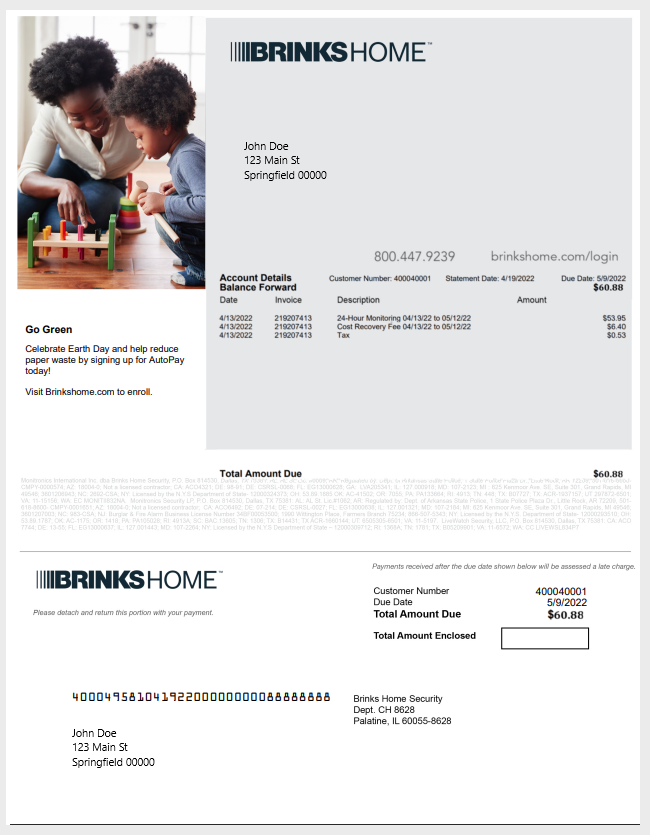
- Customer NumberIn the center of the gray box. Use it to identify your account when you contact a Support Representative or first register for the Customer Portal.
- Payment Due DateIn the center-right of the gray box. This is when your payment is due. If you use AutoPay, it's the date your payment is drafted.
- Total DueJust below the gray box, on the right. This is the amount due on your due date.
- Itemized ChargesThe list of charges for the month. Each one is explained below.
Charges Explained
Itemized Details
- 24-Hour Monitoring
- Continuous monitoring of any signals your system sends to the Brinks Home monitoring station, for your contract period or month-to-month service.
- Cost Recovery Fee
- Separate from your monthly monitoring rate. It recovers costs of monitoring and maintaining your system, including changing technology such as 2G and 3G communications being phased out.
- Tax
- Varies by municipality.
Other Charges You Might See
- Additional Equipment
- Equipment ordered, or added during a technician visit.
- Past Due Balance
- Any amount charged earlier that's still on your account.
- Credits
- Any positive balance, refunds, or credits issued to your account.
- Permit Charges
- Charges for permits, if they apply.
- Technician Charges
- Charges from a technician visit, if any.
Questions About Your Bill?
Our support team can walk you through any charge.
Contact Brinks Home™ Support